
Train AI on Your Documents.
Entirely on Your Machine.
FORGE creates custom AI models specialized for your domain — your terminology, your document types, your workflows. No cloud uploads. No machine learning skills needed.
Generic AI Doesn't Know Your Documents
Generic AI models are trained on the internet. They know a little about everything, but they don't know your documents.
When an insurance professional asks about "Coverage A: Dwelling," a generic model treats it as plain text. It doesn't know that this is the primary coverage section in a homeowner's policy, that sub-limits modify the main limit, or that exclusions and endorsements interact with it in specific ways.
Or consider a litigation firm specializing in construction defect cases. The firm's documents use terminology and structures specific to that practice — standardized expert witness reports, recurring defect taxonomies, jurisdiction-specific procedural patterns. A generic model treats this as ordinary text. After eighteen months of Librarian use, the firm trains a FORGE adapter on anonymized examples from its own closed matters. Queries about defect classifications, expert reliability patterns, and procedural strategy become meaningfully more accurate. The adapted model is the firm's asset, independent of the vendor's ongoing development.
The same is true for legal contracts, financial statements, engineering documentation, and clinical protocols. Your domain has structure, terminology, and interpretation patterns that generic models miss.
FORGE solves this by turning your documents into training data and building a custom model that understands your specific domain.
Six Steps to a Smarter Model
From document folder to domain-tuned AI — no machine learning knowledge required.
Select your documents
Pick any folder in your Librarian library as the training source.
Generate training data
FORGE analyzes your documents and creates question-answer pairs automatically.
Review and refine
Accept the good pairs, reject the weak ones. You control what the model learns.
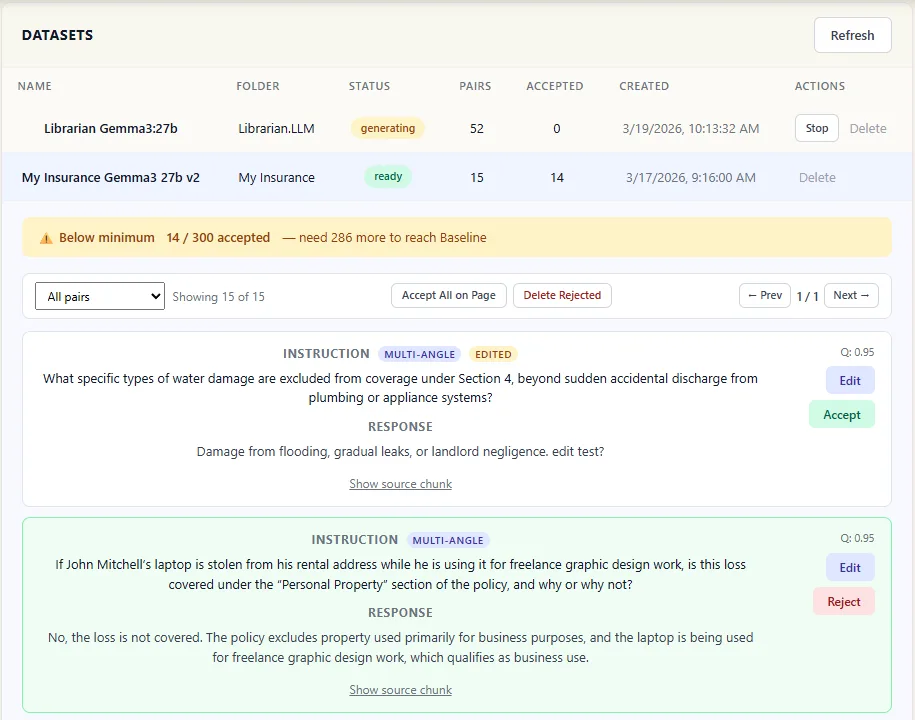 Pair review panel screenshot
 Choose a base model
Pick from our recommended models — or bring your own from HuggingFace.
Train
Click Start. Watch real-time progress. Training runs on your GPU — nothing leaves your machine.
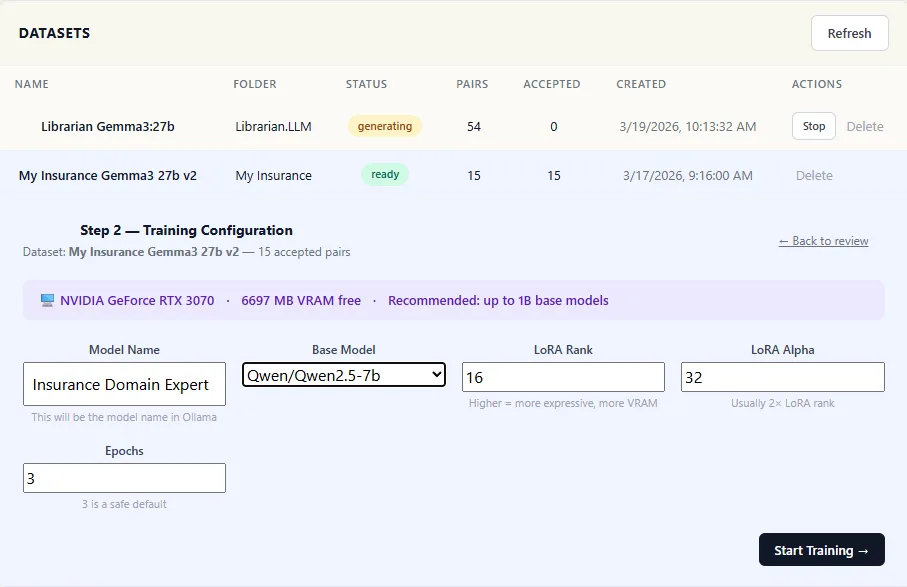 Training progress screenshot
 Assign to a folder
Attach your trained model to any document folder. It activates automatically when you chat.
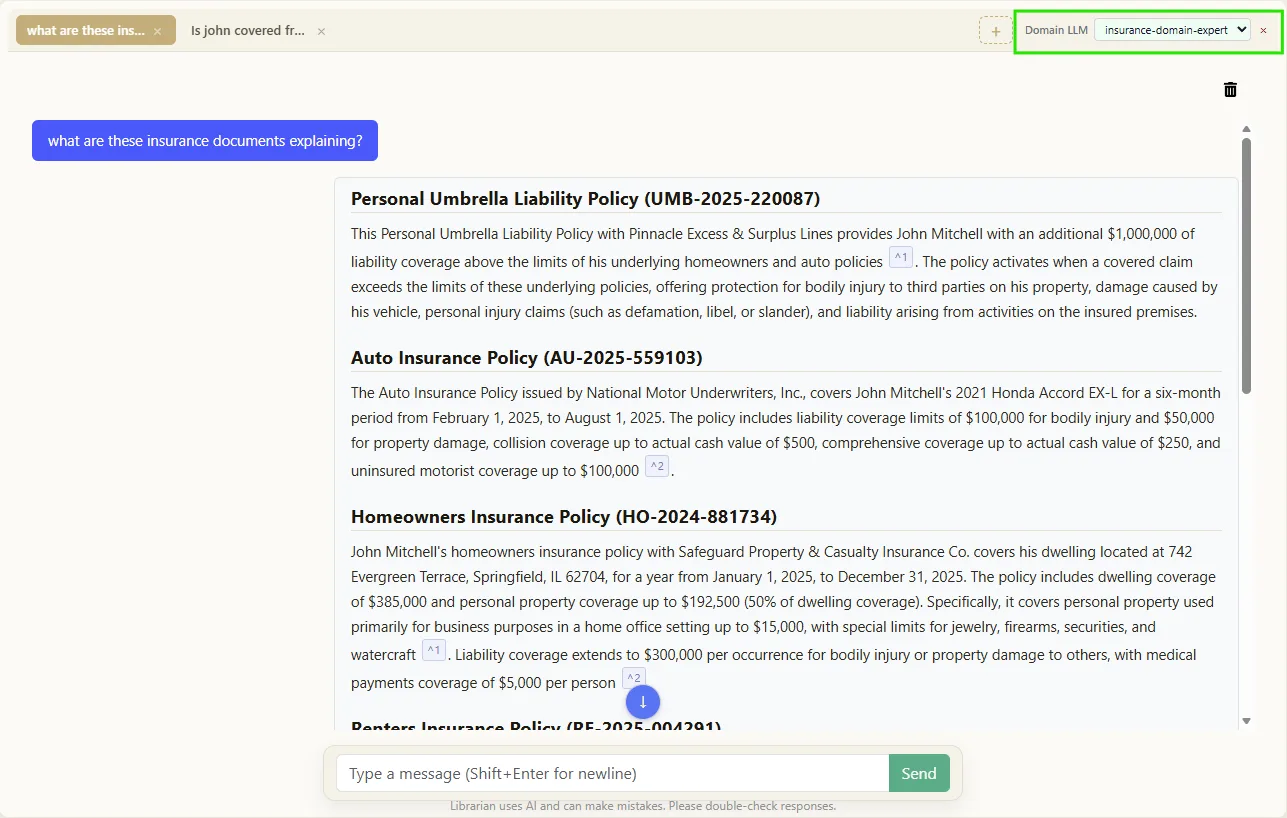 Folder assignment screenshot
 Why FORGE Changes the Game
Domain Intelligence
Your model doesn't just search your documents — it understands them. It learns the terminology, structure, and interpretation patterns specific to your field.
Completely Private
Training runs locally on your hardware. Your documents, your training data, and your custom model never leave your machine. No cloud. No third parties.
No ML Skills Needed
FORGE handles the machine learning. You review question-answer pairs and click Start. Default settings are optimized for your hardware. Advanced users can tune parameters if they choose.
Gets Better Over Time
As you add more documents and retrain, your model improves. The investment compounds — your AI gets smarter the longer you use it.
What You Need
FORGE requires an NVIDIA GPU for training. Before you start, the app detects your hardware and tells you exactly what's possible.
| Your GPU | VRAM | What You Can Train | Example Cards |
|---|---|---|---|
| Entry-level | 8 GB | Models up to 7B parameters | GTX 1070, RTX 3060, RTX 4060 |
| Mid-range | 12–16 GB | 7B models with faster training | RTX 3060 Ti, RTX 4070, RTX 4080 |
| High-end | 24+ GB | Larger models with full performance | RTX 3090, RTX 4090, Tesla/A-series |
Don't know your GPU specs? FORGE automatically detects your hardware when you open it — no guesswork needed. It shows your GPU model, available VRAM, and which base models will fit.
NVIDIA GPUs only. FORGE training requires an NVIDIA GPU with CUDA support. This covers the GTX 1070 and newer, all RTX cards, and Tesla/A-series datacenter GPUs. AMD and Apple Silicon support is on our roadmap.
Under the Hood
The technical details for ML practitioners and power users.
Training Technique
LoRA (Low-Rank Adaptation) with QLoRA 4-bit quantization via bitsandbytes. Efficient fine-tuning that runs on consumer GPUs.
Output Format
GGUF — optimized for local inference. Models are registered with Ollama and appear alongside your base models.
Base Models
Curated recommended list, plus any HuggingFace-compatible model via advanced mode.
Configurable Parameters
Rank, alpha, learning rate, and epochs are all adjustable. Sensible defaults are provided and optimized for your detected hardware.
CUDA Stack
torch==2.6.0+cu124 built for CUDA 12.4. Hardware detection via torch.cuda.is_available(). NVIDIA GPUs with 8 GB+ VRAM.
Crash Isolation
Training runs in a separate process. If training fails, Librarian continues unaffected. Reviewed training data is preserved across restarts.
FORGE Add-On
Available with any Personal or Team subscription.
FORGE is a monthly add-on to your existing Librarian subscription. Train unlimited models on your own data using your hardware.
View Plans & PricingRequires an NVIDIA GPU with at least 8 GB VRAM.
Common Questions About FORGE
Do I need machine learning experience?
No. FORGE handles the entire technical process — from generating training data to configuring model parameters. You review question-answer pairs and click Start. That's it.
Does my data leave my machine during training?
No. All training runs locally on your GPU. Your documents, training data, and the resulting custom model never leave your machine. No cloud processing, no uploads, no third parties.
How long does training take?
It depends on your hardware and dataset size. Typically between 1–4 hours. FORGE shows a time estimate before you start so there are no surprises.
Can I use my trained model outside Librarian?
Yes. Models are exported in GGUF format and registered with Ollama, so any tool that reads Ollama models can use them.
What if training fails or crashes?
Training runs in a separate process — your active Librarian sessions are never interrupted. You can restart training without losing your reviewed data.
What models can I use as a base?
FORGE provides a curated list of recommended models optimized for different use cases. Advanced users can also use any compatible model from HuggingFace.
Does FORGE work on Mac or AMD GPUs?
Not currently. FORGE requires an NVIDIA GPU with CUDA support. The entire training stack — including PyTorch CUDA 12.4, QLoRA quantization, and hardware detection — depends on NVIDIA's CUDA toolkit. AMD (ROCm) and Apple Silicon support is on our roadmap.
How many models can I train?
There's no limit. Train as many models as you like and assign each one to different document folders for domain-specific intelligence.
Ready to Train Your Own Model?
Start with a free trial of Librarian, then add FORGE to build AI that truly understands your documents.